
Street Drummer - bucket beats2.3 - Google Play
You'll be able to see results in few seconds.
Publisher Description
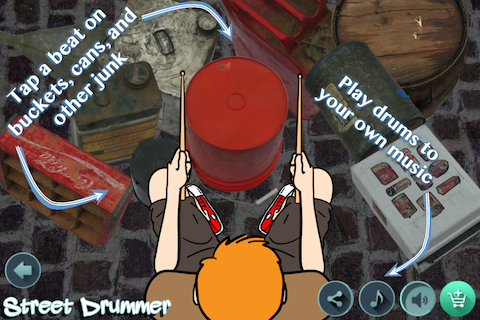
Grab your headphones and bang on pieces of junk that make great sounds all while our animated amazing street drummer plays to your beats. In Jam mode, play drums to songs in your music collection. In Song Maker mode, tap out a pattern to be repeated as background for practicing your real musical instrument. It’s your personal beatmaker with over 40 percussion instruments you won’t see or hear anywhere else.
In Jam mode, tap the musical note to select a song from your collection… then Jam on the street drums! It’s great for dubstep, west coast rap, hip hop, rock, metal, country, kanye... limited only by your imagination. See how others use it on our Youtube channel.
Create beats in Song Maker with drums and then dance or practice your piano, guitar, bass, or whatever musical instrument you like to play. Now you have a drummer to keep the rhythm loops for you - like a metranome with attitude.
The drum kit layout can be fully customized and more drums are available in the Drum Shop. Make any drumset you want. All the sound effects in this app are original; sfx that you won't find in any other drumming apps, drum pads, or drum machines.
These pieces of junk samples sound like congas, african drums, hand drums, snare drum, kick drum, bass drums, cowbell, djembe, tambourine, and cymbals. There's even a silly horn. The difference here is that they really come from real junk and you can see them and hear them and play them. Sounds of madness!
Combine Street Drummer App with an amplifier, some speakers, a mixer, your dub, and become a deejay for the street... an urban virtualdj studio for your city with endless muisc possibilities. You'll make sounds on par with the best marching bands and drumlines.
About Street Drummer - bucket beats
The company that develops Street Drummer - bucket beats is Fairlady LLC. The latest version released by its developer is 2.3.
To install Street Drummer - bucket beats on your Android device, just click the green Continue To App button above to start the installation process. The app is listed on our website since 2016-02-29 and was downloaded 0 times. We have already checked if the download link is safe, however for your own protection we recommend that you scan the downloaded app with your antivirus. Your antivirus may detect the Street Drummer - bucket beats as malware if the download link to com.fairladyllc.streetdrummer_v2 is broken.
How to install Street Drummer - bucket beats on your Android device:
- Click on the Continue To App button on our website. This will redirect you to Google Play.
- Once the Street Drummer - bucket beats is shown in the Google Play listing of your Android device, you can start its download and installation. Tap on the Install button located below the search bar and to the right of the app icon.
- A pop-up window with the permissions required by Street Drummer - bucket beats will be shown. Click on Accept to continue the process.
- Street Drummer - bucket beats will be downloaded onto your device, displaying a progress. Once the download completes, the installation will start and you'll get a notification after the installation is finished.
Program Details
System requirements
Download information
Pricing
Version History
version 2.3
posted on 2016-02-29
Minor bug fixes.
Disclaimer
Official Google Play Link
We do not host Street Drummer - bucket beats on our servers. We did not scan it for viruses, adware, spyware or other type of malware. This app is hosted by Google and passed their terms and conditions to be listed there. We recommend caution when installing it.
The Google Play link for Street Drummer - bucket beats is provided to you by apps112.com without any warranties, representations or guarantees of any kind, so access it at your own risk.
If you have questions regarding this particular app contact the publisher directly. For questions about the functionalities of apps112.com contact us.
